Kleag's MFX
Thi site describes the multieffect pedal I built using a Raspberry Pi, a Pisound sound card, the Guitarix effects software, a repurposed wooden box and various other parts. I am at version 2.2.1 of the pedal, but just beginning the documentation.
To start with, here are two images of the current version:
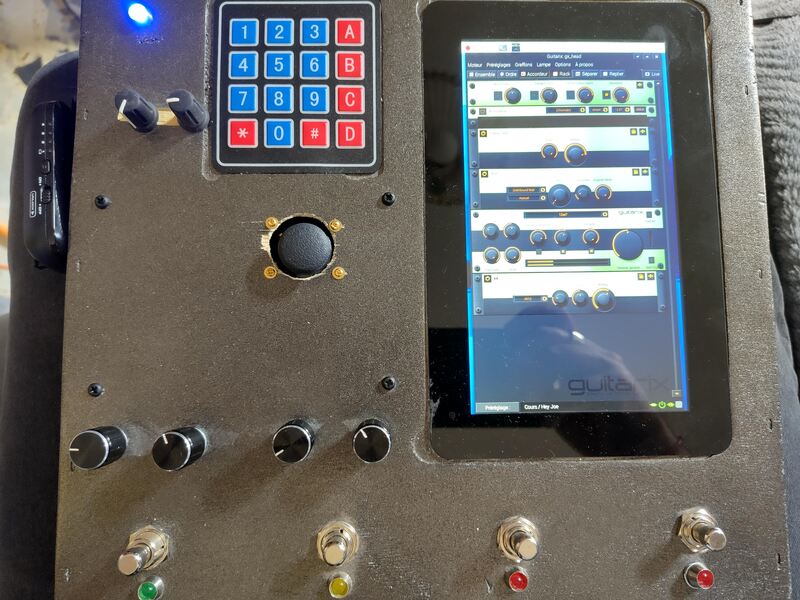
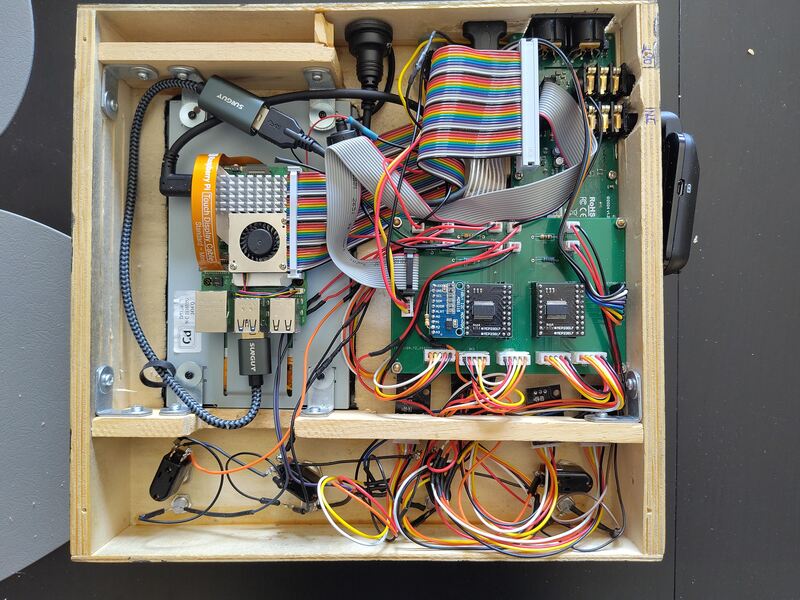
In the future, I will describe the material and software architecture and the history of the making.
ADS1115 MCP23017 https://github.com/adafruit/Adafruit-MCP23017-Arduino-Library#pin-addressing
KY-040 n°4 on MCP@0x20 - sw pin B1 (9) - but on A0, B0 (0, 8)
Pisound Raspberry Pi 5 (4 should be OK)
Joystick: ADS.P0, ADS.P1 sudo apt install python3-uinput sudo nano /etc/modules uinput
Expression Pedal: ADS.P2
sudo nano /etc/udev/rules.d/99-uinput.rules KERNEL=="uinput", SUBSYSTEM=="misc", MODE="0660", GROUP="input" sudo usermod -a -G input $USER
/boot/firmware/config.txt:
display_auto_detect=1
dtparam=i2c_arm=on
dtparam=spi=on
dtparam=i2c_arm_baudrate=400000
dtoverlay=
dtoverlay=pisound
dtoverlay=vc4-kms-v3d
usb_max_current_enable=1
sudo raspi-config
Then go to:
`Interface Options → I2C → Enable → Reboot the Pi.`

```bash
sudo apt install -y i2c-tools
sudo i2cdetect -y 1
/home/gael/.config/systemd/user/multieffect.service
/home/gael/.config/systemd/user/default.target.wants/multieffect.service -> /home/gael/.config/systemd/user/multieffect.service
[Unit]
Description=Start Guitar Multi-Effect Python Script
After=graphical-session.target

[Service]
ExecStart=python /home/gael/multieffects/multieffect.py
WorkingDirectory=/home/gael
Restart=on-failure


[Install]
WantedBy=default.target
journalctl --user-unit multieffect.service
systemctl --user disable multieffect.service
systemctl --user enable multieffect.service
systemctl --user stop multieffect.service
systemctl --user start multieffect.service
Disable wlan power management
To avoid losing Wifi unexpectedly, disable its power management. Create /etc/systemd/system/wifi-fix.service:
[Unit]
Description=Disable WiFi Power Management
After=network.target

[Service]
Type=oneshot
ExecStart=/sbin/iwconfig wlan0 power off
RemainAfterExit=yes

[Install]
WantedBy=multi-user.target
and then enable the new service:
sudo systemctl enable wifi-fix.service
sudo systemctl start wifi-fix.service
License
Copyright Gaël de Chalendar, 2025-2026. This source describes Open Hardware and is licensed under the CERN-OHL- W v2. You may redistribute and modify this documentation and make products using it under the terms of the CERN-OHL-W v2 (https:/cern.ch/cern-ohl). This documentation is distributed WITHOUT ANY EXPRESS OR IMPLIED WARRANTY, INCLUDING OF MERCHANTABILITY, SATISFACTORY QUALITY AND FITNESS FOR A PARTICULAR PURPOSE. Please see the CERN-OHL-W v2 for applicable conditions. Source location: https://github.com/kleag/kleagmfx As per CERN-OHL-W v2 section 4.1, should You produce hardware based on these sources, You must maintain the Source Location visible on the external case of the Kleag's MFX or other product you make using this documentation.